Supercharge your workflow with Nextra Plugins
Manage your Nextra.rhino and Nextra.gh instances. Bring your own Gemini key or use our affordable token packs to power advanced AI tools inside your favorite applications.
Install via Package Manager
Nextra-rhinoNextra-ghPlugin Feature
Next-generation tools built directly into your design environment.
Grasshopper AI Assistant
Automate complex visual scripting workflows. Generate nodes, debug definitions, and explore parametric variations using natural language directly within Grasshopper.
Rhino AI Assistant
Interact with your 3D models seamlessly. Execute commands, analyze geometry, and manipulate objects through an intelligent chat interface built right into Rhino.
Nextra.Rhino
Supercharge Rhino with agentic AI, knowledge accumulation, and seamless rendering.
Features
Agentic Model
Automate try-error processes and let the AI explore design solutions autonomously.
Knowledge Accumulation
AI learns from your preferences and past interactions to improve over time.
Render on Rhino
Effortless rendering capabilities directly integrated within your Rhino viewport.
How to use (Tips & Examples)
Skill Manager & Sign Up
Just let them remember your preference or anything to let them memorize.
Tower Creation
Generate complex structures like a colorful tower using natural language.
Render Tab
Simply set the viewport as you like, click capture view, ask how to render and wait.
Complex Shapes
Mathematically cool shape generation.
Interface Guide
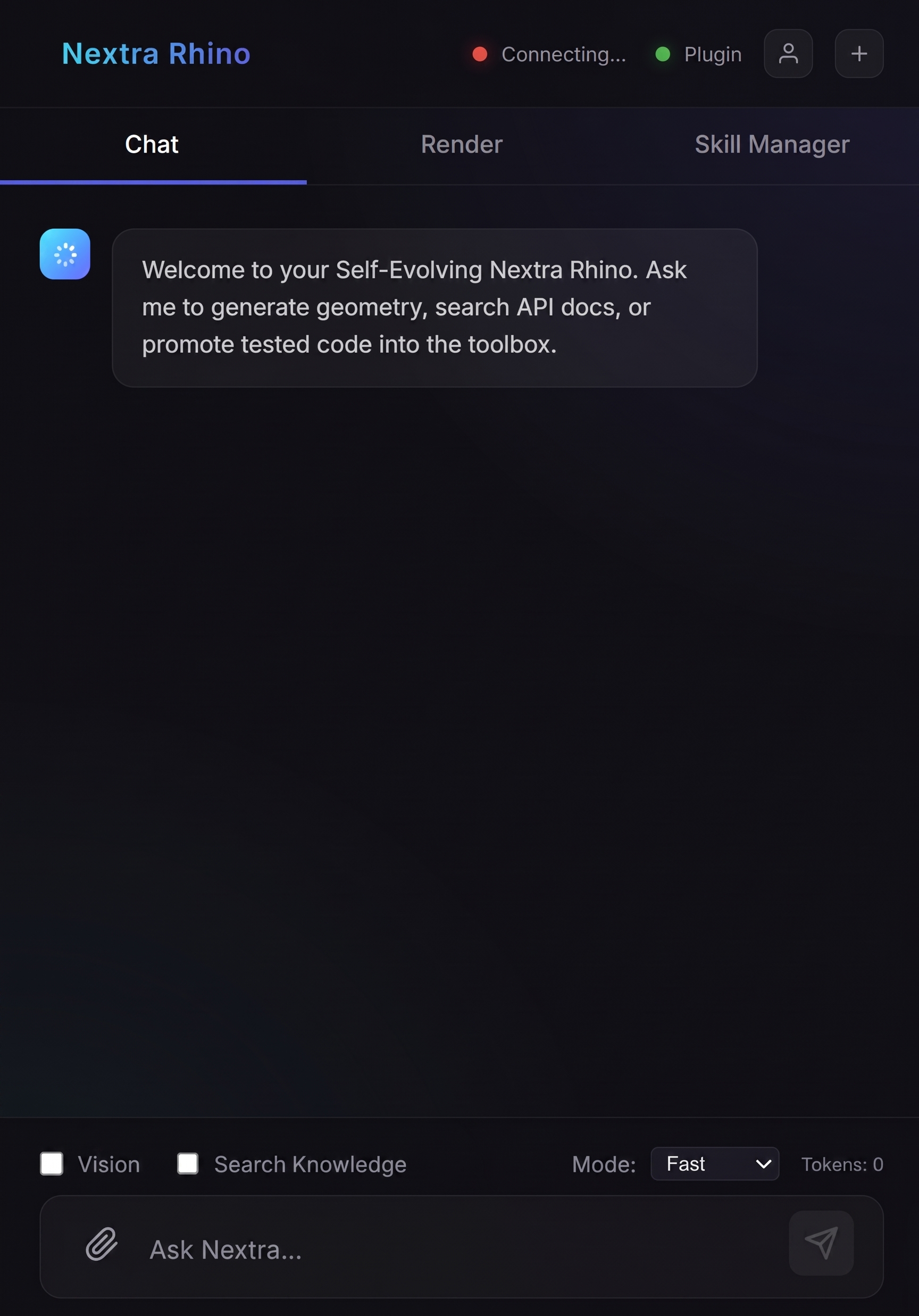
1. Chat Interface
- Cloud Connection: Connects after sending a message.
- Plugin Check: Must always be green; otherwise, try to open again.
- Human Icon: Directs you to the login page.
- New Chat (+): Try to use this more to save tokens efficiently and precisely do stuff.
- Vision: Allows AI to take screenshots and think.
- Knowledge Search: Uses user preference info and previous memory.
- Mode Dropdown: Model change.
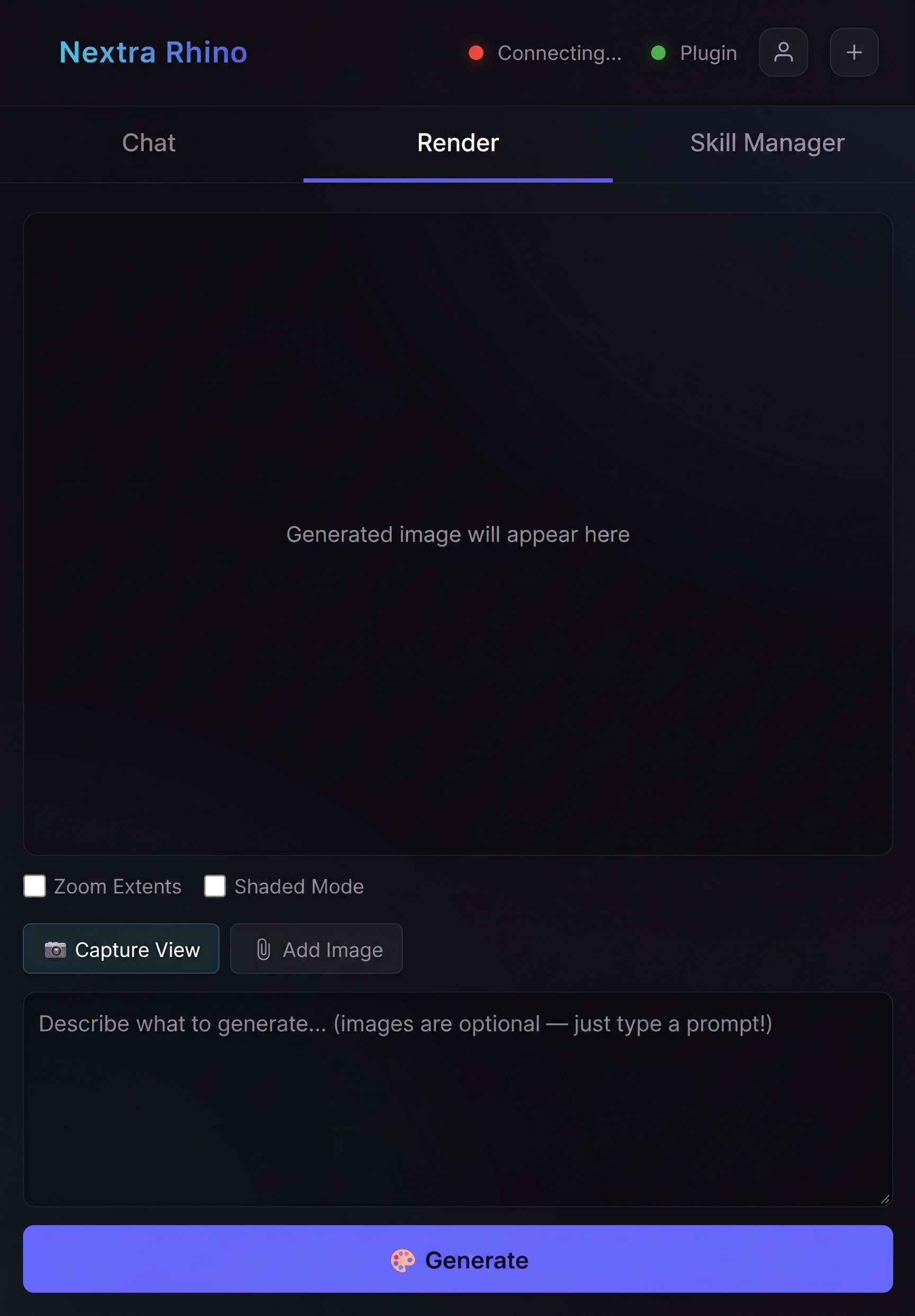
2. Render Tab
- Zoom Extents: Extends to the object.
- Shaded Mode: Automatically applies shading.
- Capture View: Click after setting up the viewport in a good way, then imports the image.
- Add Image: Allows addition of other external images.
- Generate: Click to run the rendering process.
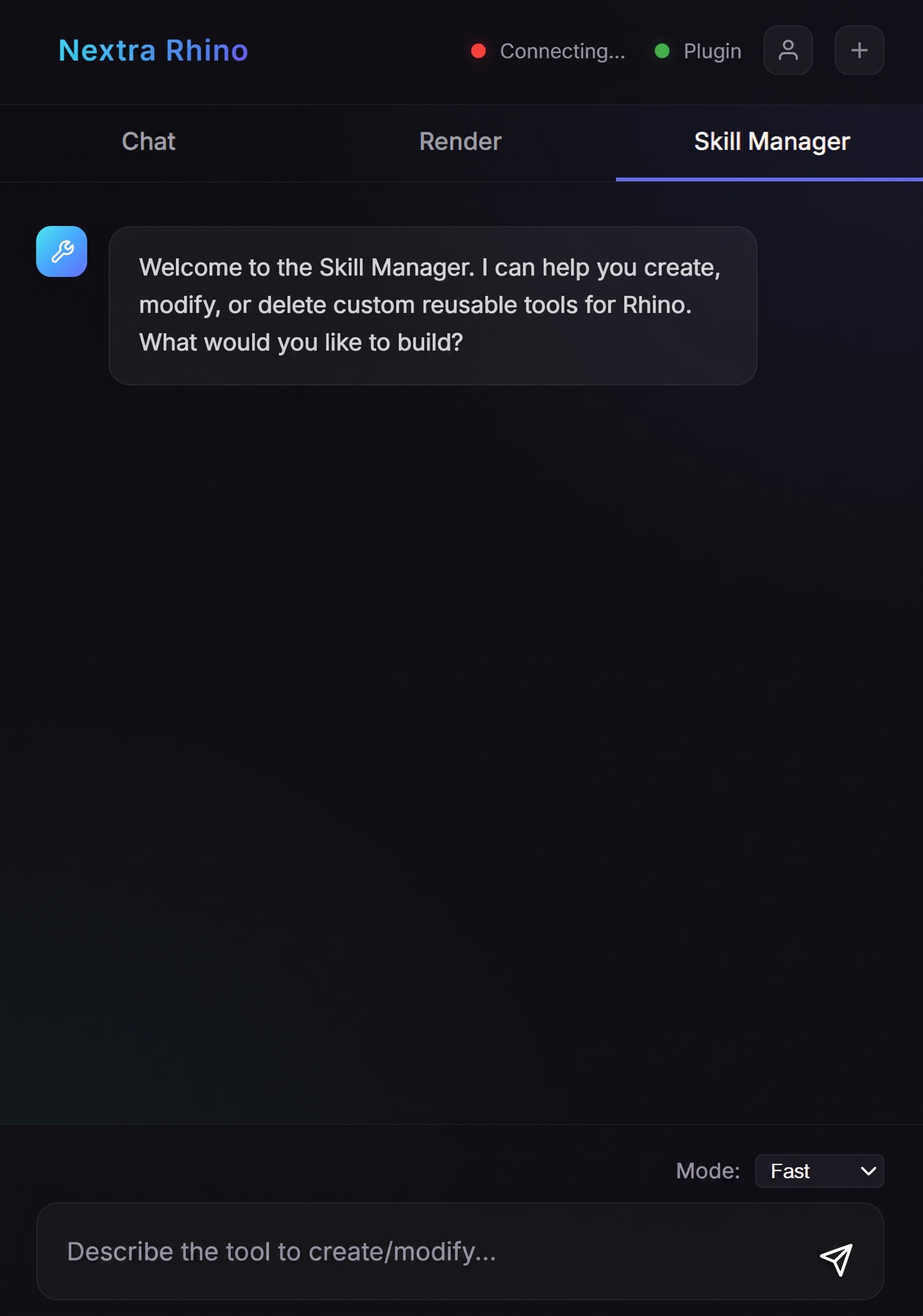
3. Skill Manager
- Mode Dropdown: Model change.
Nextra.GH
Elevate Grasshopper with agentic capabilities, script tidy-ups, and universal plugin support.
Features
Agentic Mode
Advanced AI autonomy for node generation and script logic.
Select & Modify
Select components you want to modify, and the AI will safely adjust your script.
Knowledge Accumulation
Store and reuse Grasshopper snippets and logic continuously.
Tidyup Script
Tidyup button on top to organize and clean up the whole script.
Any Plugin Support
Any installed plugin could be used by the AI seamlessly.
How to use (Tips & Examples)
Sign Up & Basics
Get started with Nextra.gh and skill manager basics.
Tower Creation & Tidyup
Generate complex structures like a tower using natural language and automatically tidy up the generated script.
Skill Manager & C#
Select script to let them learn, explain what it is, and use C# components.
Python Integration
Ask to make the same thing as C# current one with Python effortlessly.
Interface Guide
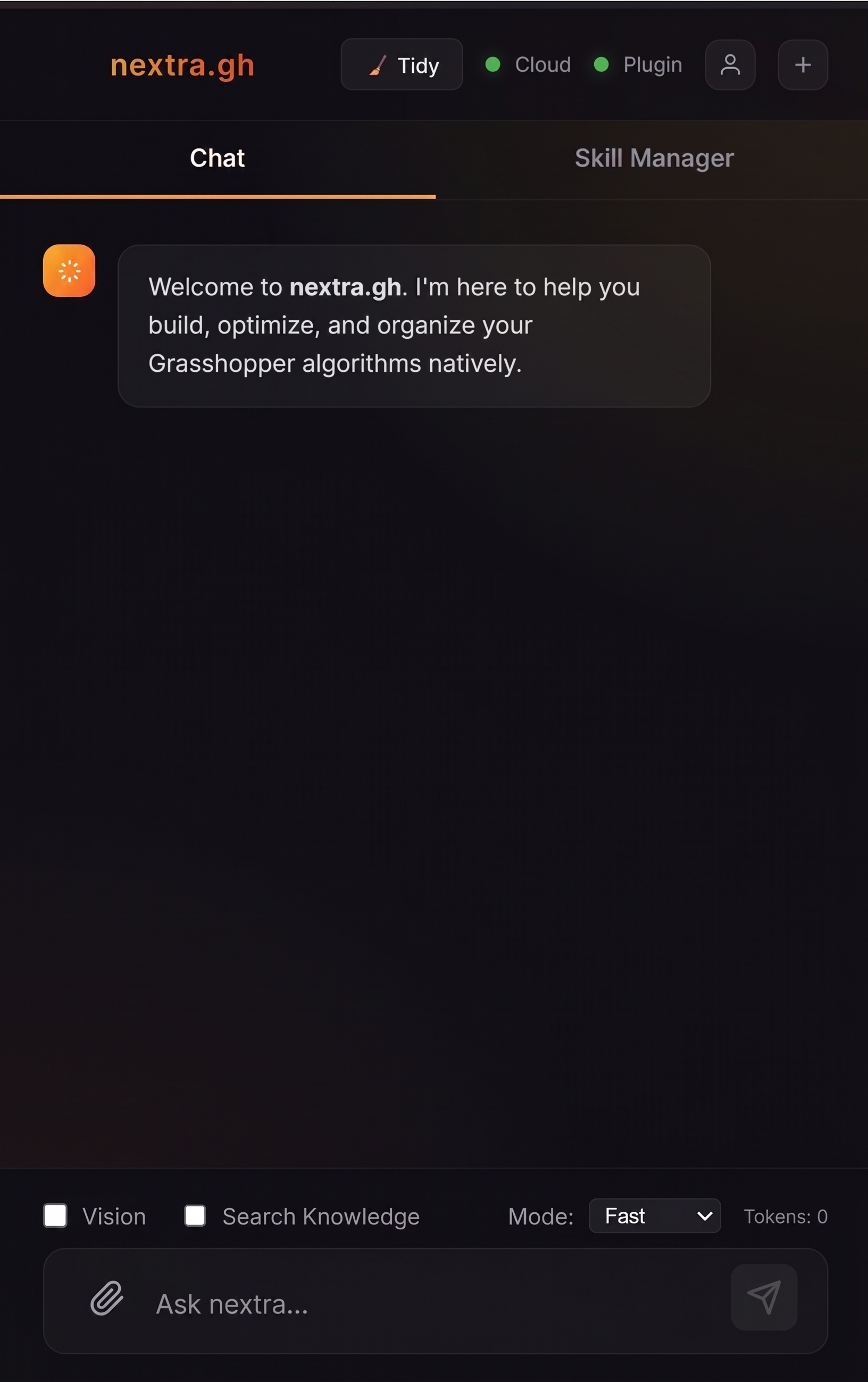
1. Chat Interface
Similar to the Nextra.Rhino interface, but with specialized tools.
- Tidy Button: Click to tidy up your Grasshopper components.
- New Chat (+): Try to use this more to save tokens efficiently and precisely do stuff.
- Plugin Check: Always check the right connection light; if it's red, try to open again.
- Cloud Connection: Connects after sending a message.
- Human Icon: Directs you to the login page.
- Vision: Allows AI to take screenshots and think.
- Knowledge Search: Uses user preference info and previous memory.
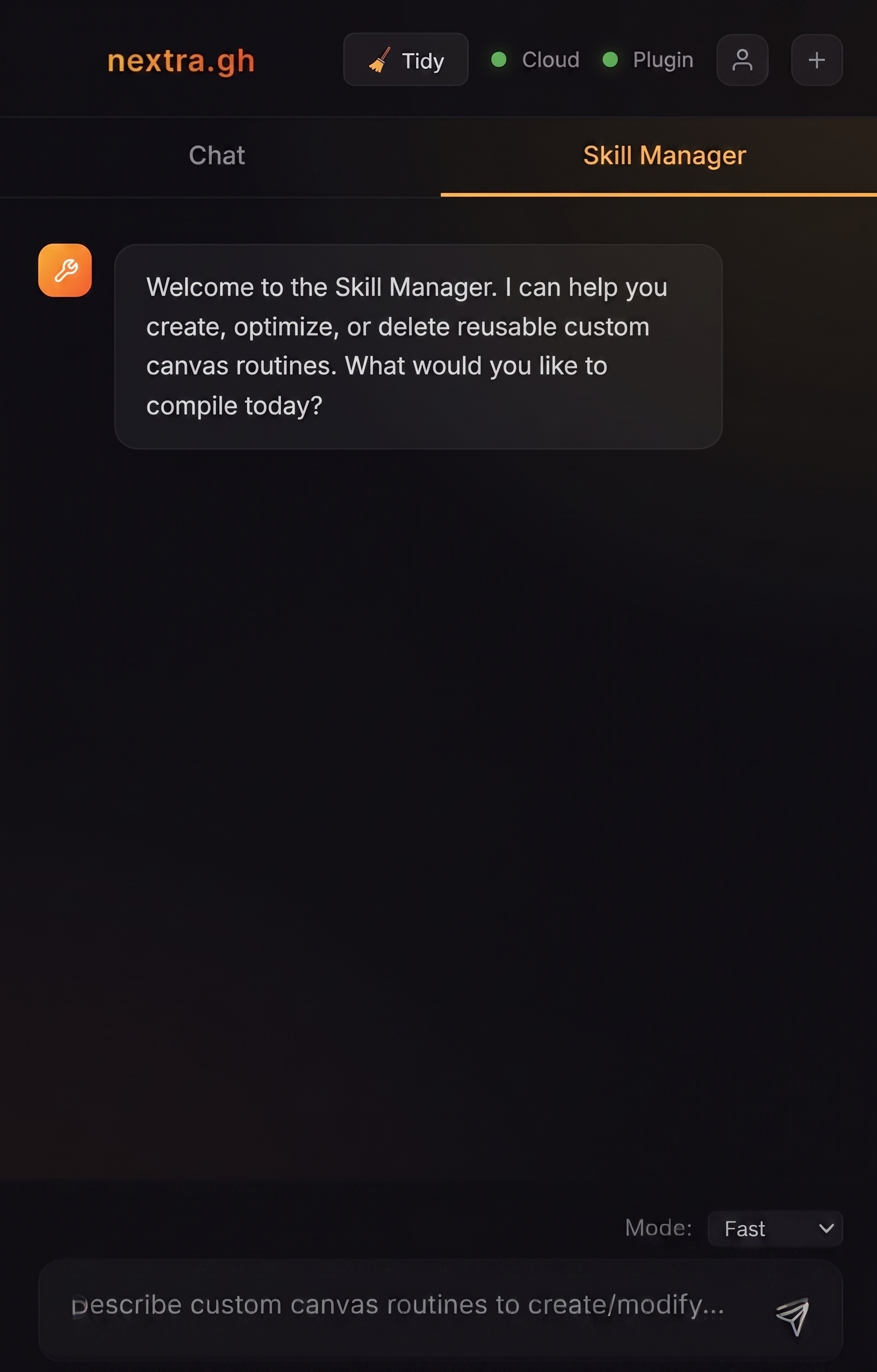
2. Skill Manager
- Mode Dropdown: Model change.
Choose Your Plan
Flexible options for every type of workflow.
Free Plan
Limited tokens available. Refills automatically on the 1st of every month.
Pro Plan
Generous tokens available.
✨ Up to 2x more cost-efficient than token packs
Ultra Plan
Maximum tokens available.
✨ Maximum cost efficiency (over 2x cheaper)
Pay-As-You-Go Top Up
Need a quick burst of tokens without subscribing? Buy a fixed token pack. Tokens expire after 1 month.
Bring Your Own Key (BYOK)
Have your own Google Cloud Gemini key? Connect it in Settings to bypass subscriptions completely. You will only pay Google directly for what you use.
Get in Touch
Have questions about our enterprise plans or custom plugin development? Send us a message.